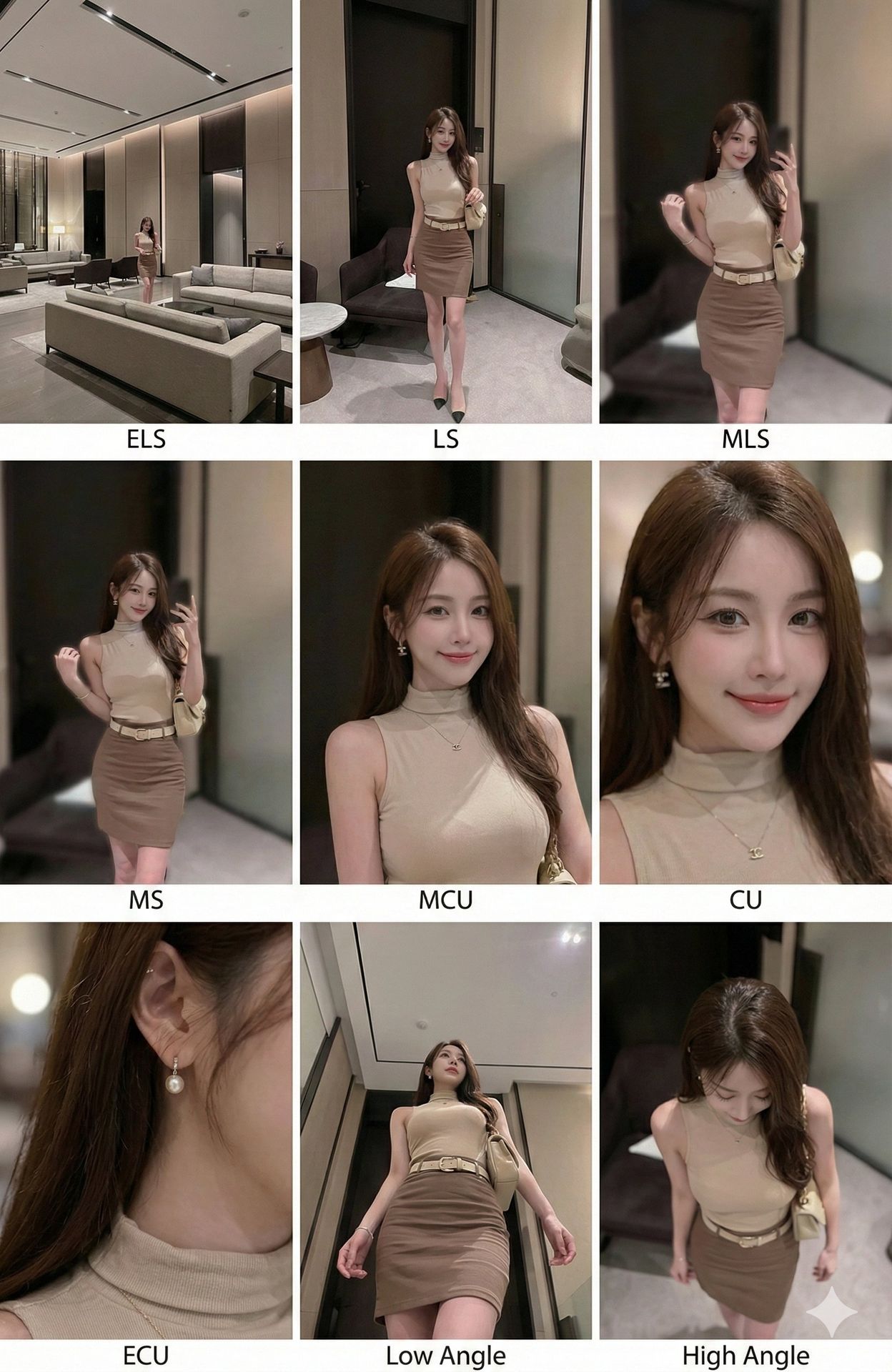
Sinematik Kontak Sayfası - 9 Kare Izgara
Herhangi bir görüntüyü, şık metin etiketleriyle 9 farklı kamera açısı ve odak uzunluğunu sergileyen profesyonel 3x3 sinematik storyboard ızgarasına dönüştürün
<instruction>
Giriş görüntüsünün kompozisyonunu analiz edin. Ana özneleri ve çevrelerini belirleyin.
Bu öznelerin 9 farklı sinematik çekimini sergileyen tutarlı bir 3x3 ızgara "Kontak Sayfası" oluşturun.
**Kritik olarak, her panelin alt kısmına şık, modern ve sinematik metin etiketleri yerleştirin.**

Standart çekim türlerini içeriğe uygun şekilde ayarlayın:

Satır 1 (Tanıtım):
1. Aşırı Uzak Çekim (ELS): Özneler geniş bir çevre içinde küçük görünür. [Etiket metni: "ELS"]
2. Uzak Çekim (LS): Özne tepeden tırnağa tamamen görünür. [Etiket metni: "LS"]
3. Orta Uzak Çekim (MLS): Dizlerden yukarısı çerçevelenir. [Etiket metni: "MLS"]

Satır 2 (Ana Kapsam):
4. Orta Çekim (MS): Belden yukarısı çerçevelenir. Etkileşime odaklanılır. [Etiket metni: "MS"]
5. Orta Yakın Çekim (MCU): Göğüsten yukarısı çerçevelenir. [Etiket metni: "MCU"]
6. Yakın Çekim (CU): Yüze sıkı çerçeveleme. [Etiket metni: "CU"]

Satır 3 (Detaylar ve Açılar):
7. Aşırı Yakın Çekim (ECU): **Belirli vücut özelliklerine veya takılara makro odak (örn. küpeli bir kulak, bir göz veya bir el). Düz kumaş veya nesne dokularına odaklanmayın.** [Etiket metni: "ECU"]
8. Alçak Açı Çekimi: **Dinamik, heybetli bir perspektif oluşturmak için yerden yukarıya doğru aşırı alçak açıdan çekim.** [Etiket metni: "Low Angle"]
9. Yüksek Açı Çekimi: Özneye yukarıdan aşağıya bakış. [Etiket metni: "High Angle"]

Kesin tutarlılık sağlayın: aynı özneler, kıyafetler ve aydınlatma.
**Metin yerleşimleri, jenerik stillerden kaçınarak şık, profesyonel bir yazı tipinde net şekilde yazılmalıdır.**
</instruction>

**Şık metin etiketleri** içeren 9 panelden oluşan profesyonel 3x3 sinematik storyboard ızgarası.
Izgara, giriş görüntüsündeki belirli özneleri kapsamlı bir odak uzunluğu yelpazesinde gösterir.
Üst Satır: Geniş çevre çekimi ("ELS"), tam görünüm ("LS"), diz çekimi ("MLS").
Orta Satır: Belden yukarı ("MS"), göğüsten yukarı ("MCU"), yüz yakın çekimi ("CU").
Alt Satır: **Makro aksesuar/vücut detayı** ("ECU"), **dinamik aşırı alçak açı** ("Low Angle"), yüksek açı ("High Angle").
Tüm kareler foto-gerçekçi dokular, tutarlı sinematik renk derecelendirmesi ve karşılık gelen **modern tipografi** ile doğru kompozisyon içerir.Bu prompt ile oluştur
Oluşturulan görselleriniz burada görünecek
İlgili Prompt'lar
Bu Prompt Nasıl Kullanılır
Etkileyici görsel varyasyonları oluşturmak hızlı ve sezgiseldir:
Step 1: Fotoğrafınızı Yükleyin
Başlangıç noktası olarak kullanmak için cihazınızdan bir görsel seçin. En iyi sonuçlar için istediğiniz çıktı en-boy oranına uyan, iyi aydınlatma ve çözünürlüğe sahip net görseller kullanın.
Step 2: Değişikliklerinizi Tanımlayın
Görseli nasıl dönüştürmek istediğinizi açıklayan bir prompt yazın. Uygulamak istediğiniz stil, renkler, değişiklikler veya sanatsal efektler hakkında spesifik olun.
Step 3: Ayarları Düzenleyin
Sonucun orijinal görselinize ne kadar benzeyeceğini kontrol etmek için en-boy oranı, çıktı sayısı ve dönüşüm gücü gibi dönüşüm parametrelerini ince ayarlayın.
Step 4: Oluşturun ve İndirin
Oluştur'a tıklayın ve AI'ın görselinizi dönüştürmesini izleyin. Sonuçlara göz atın, favorilerinizi seçin ve kullanıma hazır yüksek kaliteli versiyonları indirin.
Kendi Görselinizi Oluşturmaya Hazır mısınız?
Görsellerinizi AI ile dönüştürmek için bu prompt'u kullanın. Fotoğrafınızı yükleyin ve sihrin gerçekleşmesini izleyin.