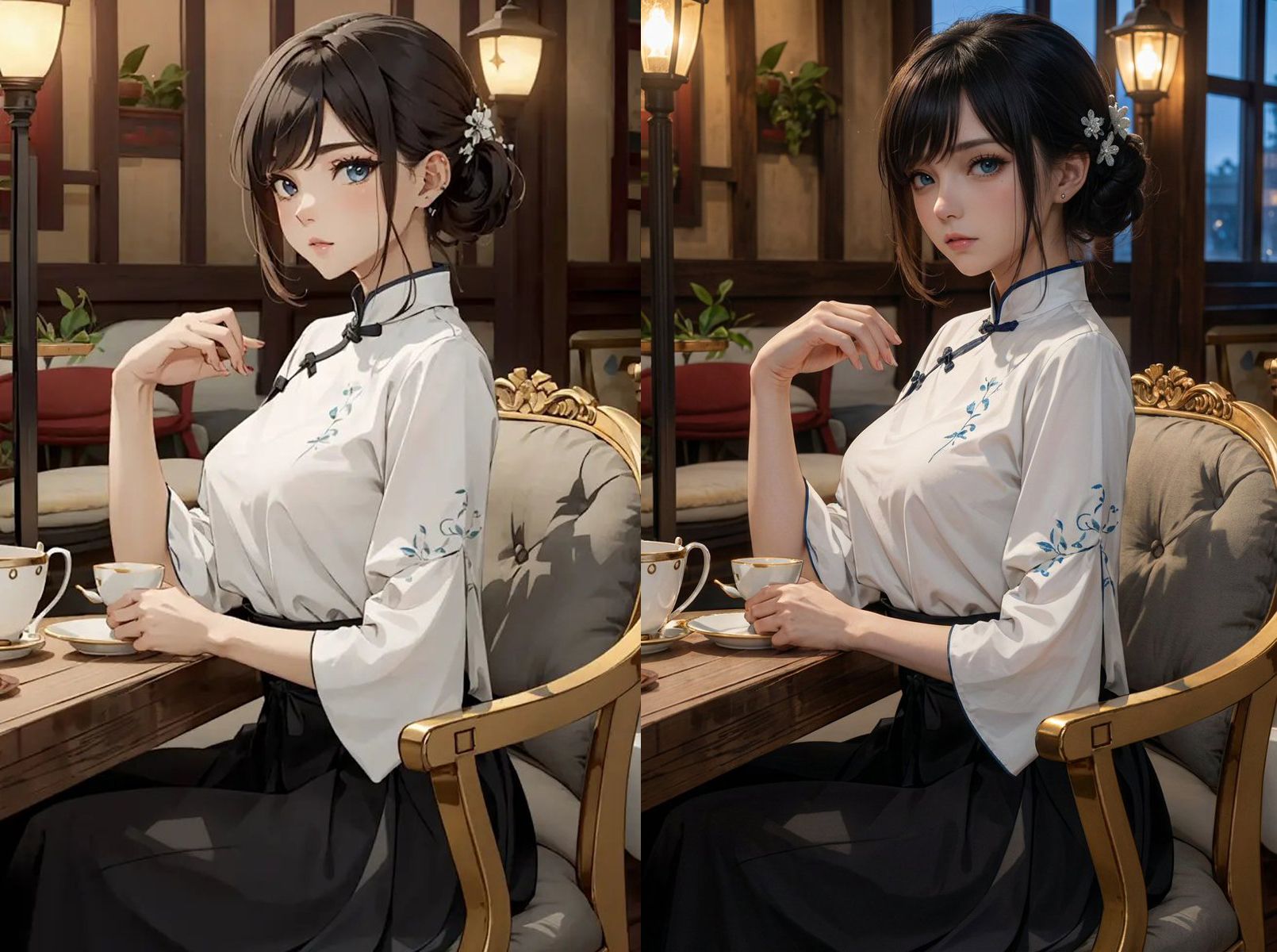
Transformer un Personnage d'Anime en Humain Réaliste
Transformez vos personnages d'anime ou de dessins animés préférés en photographies ultra-réalistes époustouflantes grâce à cette intelligence artificielle révolutionnaire. Cet outil de génération d'images IA préserve méticuleusement chaque détail emblématique : coiffure caractéristique, tenue vestimentaire, expression faciale et identité du personnage, tout en créant un rendu photographique cinématographique digne d'un smartphone professionnel. L'algorithme applique une profondeur de champ immersive et un éclairage dramatique pour produire des portraits photoréalistes saisissants. Idéal pour les créateurs de contenu, les artistes numériques et les passionnés d'anime souhaitant visualiser leurs personnages favoris dans notre monde réel. Téléchargez simplement une image claire avec des traits faciaux visibles, et l'IA opère sa magie de transformation photo. Les personnages aux tenues distinctives et coiffures marquées offrent les résultats les plus spectaculaires. Parfait pour créer des fan arts uniques, des projets créatifs ou explorer de nouvelles dimensions artistiques en fusionnant l'univers de l'animation avec la photographie hyperréaliste contemporaine.
Transformez ce personnage de bande dessinée en humain ultra-réaliste tout en préservant la coiffure originale, la tenue, l'expression faciale et l'identité globale du personnage.
L'ensemble de la scène doit utiliser une grande profondeur de champ, gardant à la fois le modèle et l'environnement extrêmement nets, créant un rendu immersif de photographie cinématographique prise au smartphone.

STYLE:
- Photographie de mode ultra-réaliste cinématographique
- Esthétique de caméra smartphone haute résolution avec des détails nets et précis
- Contraste d'éclairage dramatique entre les lumières chaudes de travail et les tons froids du crépuscule
- le modèle est le sujet principal tout en conservant des détails environnementaux riches

TECHNICAL SPECS:
- Camera: flagship smartphone camera
- Lens: standard built-in phone lens
- Aperture: f/8–f/11 for deep depth of field
- Resolution: 4K or higher

NEGATIVE PROMPT:
- blurry background, shallow depth of field, bokeh
- out of focus, distorted face
- cartoon, anime, CGI character, illustration, painting look
- low quality, pixelation, noise
- harsh direct sunlight or overexposed lighting
Générer avec ce prompt
Vos images générées apparaîtront ici
Prompts Associés
Comment Utiliser Ce Prompt
Créer des variations d'images époustouflantes est rapide et intuitif :
Step 1: Téléchargez Votre Photo
Sélectionnez une image depuis votre appareil comme point de départ. Pour de meilleurs résultats, utilisez des images claires avec un bon éclairage et une résolution correspondant au ratio d'aspect souhaité.
Step 2: Décrivez Vos Modifications
Rédigez un prompt décrivant comment vous souhaitez transformer l'image. Soyez précis sur le style, les couleurs, les modifications ou les effets artistiques que vous voulez appliquer.
Step 3: Ajustez les Paramètres
Affinez les paramètres de transformation comme le ratio d'aspect, le nombre de sorties et l'intensité de transformation pour contrôler à quel point le résultat ressemble à votre image originale.
Step 4: Générez et Téléchargez
Cliquez sur générer et regardez l'IA transformer votre image. Parcourez les résultats, sélectionnez vos favoris et téléchargez les versions haute qualité prêtes à l'emploi.
Prêt à Créer le Vôtre ?
Utilisez ce prompt pour transformer vos images avec l'IA. Téléchargez votre photo et laissez la magie opérer.